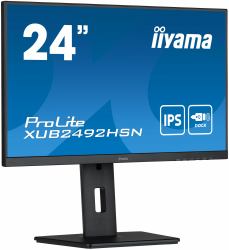
iiyama ProLite XUB2492HSN-B5 computer monitor 61 cm [24"] 1920 x 1080 pixels Full HD LED Black

MPN: XUB2492HSN-B5
Quick Code: B47377378
(iiyama - PROLITE XUB2492HSN-B5 24' IPS technology panel)
🔍
iiyama ProLite XUB2492HSN-B5 computer monitor 61 cm [24"] 1920 x 1080 pixels Full HD LED Black
Product Image 1 Product Image 2 Product Image 3 Product Image 4 Product Image 5 Product Image 6 Product Image 7 Product Image 8 Product Image 9 Product Image 10 Product Image 11 Product Image 12
Note: Image accuracy is not guaranteed. Please do not rely solely on the image for your purchase.

📹 View Product Demo

£153.24
£183.89 inc. VAT
Overseas Customers with EU-VAT number do not pay VAT. - Verify it here
Quick Code: B47377378
MPN: XUB2492HSN-B5
Manufacturer: iiyama
EAN Code: 4948570121526
💰 Get £1.10 Cash Back if paying by Debit Card or Bank Transfer!
📧 Request More Info

Have questions? Need a quote?

Contact Us
📬 Notify me when price drops
NOTE: The information below is provided for your convenience only and we cannot guarantee its accuracy. If necessary, please verify with us before purchasing.

iiyama ProLite XUB2492HSN-B5 computer monitor 61 cm (24") 1920 x 1080 pixels Full HD LED Black24", 60.5cm, IPS, 1920x1080, 75Hz, 16:9, 250 cd/m², 1000:1, 4ms, 178°/178°, 16.7mln, sRGB: 99%

24" IPS technology panel with USB-C dock and RJ45 (LAN)

Equipped with a USB-C dock connector, the XUB2492HSN allows you to simplify your workspace by using a single cable to both send signal from your notebook to your monitor and power and charge the notebook from the monitor. Additionally, if your monitor is connected to the Internet with a LAN cable, your notebook will automatically be connected to the network as well. Thanks to a DisplayPort output you can easily extend your desktop by creating a double-monitor set-up. Supplied with a 150mm height-adjustable stand featuring pivot and swivel functions, the XUB2492HSN allows you to easily adjust the screen position to your preferences.

USB-C DOCK
The dock allows you to connect your laptop with a single cable to the monitor to both make sure it is charged and connected to a wired network and signal from the laptop is sent to the monitor. A second monitor can be connected to the DisplayPort (MST) output to create a multi-monitor set-up. With additional USB-ports, your mouse, keyboard or webcam can also be connected to the monitor. All thanks to a single cable connecting your laptop* to the USB C dock in the monitor.
*Functions vary depending on your laptop USB-C support.