NOTE: The information below is provided for your convenience only and we cannot guarantee its accuracy. If necessary, please verify with us before purchasing.
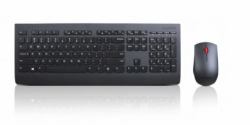
Lenovo Professional Wireless Keyboard and Mouse ComboProfessional Wireless Keyboard and Mouse Combo
This sleek and stylish full-size keyboard and mouse combo offers exceptional quality in a modern wireless solution. The slim 3-zone keyboard with number pad has responsive quiet keys and a premium typing experience. One touch dedicated media keys put the controls you use most at your fingertips. The ergonomic full-size mouse provides comfort and support for all day use. Complete tasks with ease using the precise 1600dpi laser sensor and 4-way scroll wheel. Connect compatible Lenovo devices with just 1 nano receiver.
Highlights:Lose the Wires: reliable 2.4ghz wireless connection with multiple pairing protocol 2 in 1 Convenience: plug and play micro wireless receiver easily connects both keyboard and mouse
No Guessing: 2 year commercial battery life with LED indicators (may vary based on user habits.)
Pairing the Lenovo USB Receiver with a mouse or a keyboardBy default, the Lenovo Professional Wireless Keyboard and Mouse Combo is paired with the Lenovo USB Receiver that shipped with the product. The Lenovo Professional Wireless Keyboard and Mouse Combo is ready for use after you connect it to your computer. In addition to the Lenovo Professional Wireless Keyboard and Mouse Combo, you also can pair the Lenovo USB Receiver with any Lenovo wireless mouse or keyboard printed with the icon
To pair the Lenovo USB Receiver with a new Lenovo wireless mouse or keyboard, do the following:
1.Connect the Lenovo USB Receiver to an available USB connector on your computer.
2.Place the mouse or keyboard within 10 cm (3.94 inches) of the Lenovo USB Receiver.
3.Move the power switch on the mouse or keyboard to the on position.
4.Press and release the pairing button on the mouse or keyboard. After the status indicator on the mouse or keyboard blinks for five times and then turns off, the Lenovo USB Receiver has been successfully paired with the mouse or keyboard.