
Lenovo Professional Wireless Keyboard and Mouse Combo
MPN: Quick Code:
(Lenovo Professional Wireless Keyb & Mouse - ES. KEYBOARD: Spain. WARRANTY: 1YM)
** NEW - GENERIC BOX **
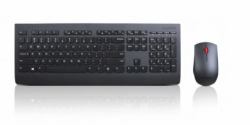
Note: Image accuracy is not guaranteed. Please do not rely solely on the image for your purchase.
$18.21 $21.85 inc. VAT
6 in stock Check stock Available
All products on this website are available duty-free in the EU
Overseas Customers with EU-VAT number do not pay VAT. -
- Quick Code:
- MPN:
- Manufacturer:
- Lenovo
- EAN Code:

NOTE: The information below is provided for your convenience only and we cannot guarantee its accuracy. If necessary, please verify with us before purchasing.
Highlights:
Lose the Wires: reliable 2.4ghz wireless connection with multiple pairing protocol 2 in 1 Convenience: plug and play micro wireless receiver easily connects both keyboard and mouse
No Guessing: 2 year commercial battery life with LED indicators (may vary based on user habits.)
Pairing the Lenovo USB Receiver with a mouse or a keyboard
By default, the Lenovo Professional Wireless Keyboard and Mouse Combo is paired with the Lenovo USB Receiver that shipped with the product. The Lenovo Professional Wireless Keyboard and Mouse Combo is ready for use after you connect it to your computer. In addition to the Lenovo Professional Wireless Keyboard and Mouse Combo, you also can pair the Lenovo USB Receiver with any Lenovo wireless mouse or keyboard printed with the icon
To pair the Lenovo USB Receiver with a new Lenovo wireless mouse or keyboard, do the following:
1.Connect the Lenovo USB Receiver to an available USB connector on your computer.
2.Place the mouse or keyboard within 10 cm (3.94 inches) of the Lenovo USB Receiver.
3.Move the power switch on the mouse or keyboard to the on position.
4.Press and release the pairing button on the mouse or keyboard. After the status indicator on the mouse or keyboard blinks for five times and then turns off, the Lenovo USB Receiver has been successfully paired with the mouse or keyboard.