NOTE: The information below is provided for your convenience only and we cannot guarantee its accuracy. If necessary, please verify with us before purchasing.
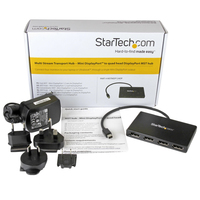
StarTech.com 4-Port Multi Monitor Adapter - Mini DisplayPort to DisplayPort MST Hub - 4x 1080p - Video Splitter for Extended Desktop Mode on Windows PCs Only - mDP to Quad DP MonitorsStarTech.com 4-Port Multi Monitor Adapter - Mini DisplayPort to DisplayPort MST Hub - 4x 1080p - Video Splitter for Extended Desktop Mode on Windows PCs Only - mDP to Quad DP Monitors (MSTMDP124DP)
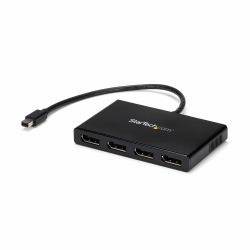
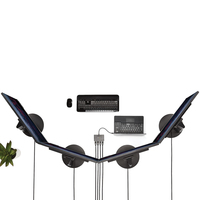
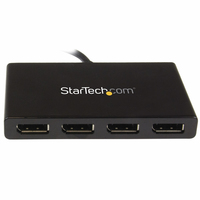
Use this adapter to connect four independent displays to a single mDP 1.2 port
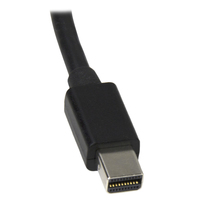
This MST hub lets you connect four monitors to your Mini DisplayPort™ (mDP) 1.2 equipped Windows® tablet, laptop or desktop.
Increase productivity with multiple screens
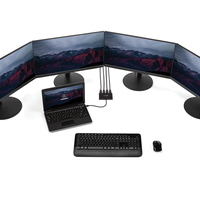
The newest generations of computers are more portable than ever, which often means that you're left with fewer video outputs and smaller integrated screens. This MST hub solves both of these problems by letting you connect four additional displays to your computer, which makes multitasking much easier.
Connect to any display
With the MST hub, you can use Mini DisplayPort video adapters and cable adapters that enable you to connect HDMI, VGA or DVI displays. This ensures that your MST hub will be compatible with virtually any television, monitor or projector. The hub is VESA and DisplayPort certified to support DP 1.2 enabled systems, for seamless integration with your existing video equipment.
Configure your displays for any environment
Using the MST hub, you can extend your desktop onto additional monitors and stream independent content to each display, giving you the freedom to multitask and increase your productivity. You can also mirror the same image onto multiple displays for remote viewing applications such as digital signage.
Enjoy amazing video quality, without draining system resources
MST technology uses your existing video card to minimize the use of system resources while delivering Ultra HD 4K resolutions. This unprecedented performance makes MST perfect for high-resolution applications such as graphic design, gaming and medical imaging.
Note: When using a DisplayPort 1.1 video card the MSTMDP124DP will act as a splitter, automatically mirroring your video source across all displays. Resolution limitations apply.
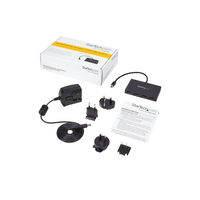
The MSTMDP124DP supports plug-and-play installation for a hassle-free setup, and is backed by a StarTech.com 3-year warranty and free lifetime technical support.
Notes: MST shares 21.6 Gbps across all attached displays. Higher resolutions can restrict the available bandwidth with the remaining ports, please see our guideline below for determining an ideal resolution for your setup. Certain graphics adapters have limited MST support and will only output to three displays in total. If more than three monitors are attached, the fourth will be disabled.
The Surface Pro 3, Surface Pro 4, and Surface Book only support the use of three displays in total. If this device is used with the Surface Pro 3, and three external monitors, the built-in touch screen on your Surface will be disabled.
Average resolution bandwidth allocation
1920x1080 (High-definition 1080p) @60hz - 22%
1920x1200 @60hz - 30%
2560x1440 @60hz - 35%
2560x1600 @60hz - 38%
3840 x 2160 (Ultra HD 4K) @30hz - 38%
Note: Exceeding 100% will reduce functionality.
Examples of supported resolution configurations
Screen 1 Resolution
Screen 2 Resolution
Screen 3 Resolution
Screen 4 Resolution
Total % of Bandwidth
1920x1080 @60hz (22%)
1920x1080 @60hz (22%)
1920x1080 @60hz (22%)
1920x1080 @60hz (22%)
88%
1920x1200 @60hz (30%)
1920x1080 @60hz (22%)
1920x1080 @60hz (22%)
1920x1080 @60hz (22%)
96%
3840x2160 @30hz (38%)
1920x1080 @60hz (22%)
1920x1080 @60hz (22%)
off
82%
3840x2160 @30hz (38%)
1920x1200 @60hz (30%)
1920x1080 @60hz (22%)
off
90%
Examples of unsupported resolution configurations
Screen 1 Resolution
Screen 2 Resolution
Screen 3 Resolution
Screen 4 Resolution
Total % of Bandwidth
2560x1600 @60hz (38%)
2560x1600 @60hz (38%)
1920x1200 @60hz (30%)
1920x1200 @60hz (30%)
136%
3840x2160 @30hz (38%)
2560x1600 @60hz (38%)
1920x1200 @60hz (30%)
1920x1200 @60hz (30%)
136%
3840x2160 @30hz (38%)
2560x1600 @60hz (38%)
2560x1440 @60hz (35%)
1920x1200 @60hz (30%)
141%
3840x2160 @30hz (38%)
3840x2160 @30hz (38%)
3840x2160 @30hz (38%)
off
114%
The StarTech.com Advantage