
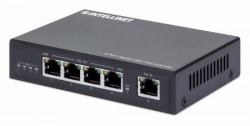
Intellinet 4-Port Gigabit Ultra PoE Extender, Adds up to 100 m [328 ft.] to PoE Range, 90 W PoE Power Budget, Four PSE Ports with up to 30 W Output, IEEE 802.3bt/at/af Compliant, Metal Housing
MPN: Quick Code:
(4-PORT ULTRA POE EXTENDER- IEEE - 802.3BT/AT/AF 4X 30W 100M)
Note: Image accuracy is not guaranteed. Please do not rely solely on the image for your purchase.
$102.59 $123.11 inc. VAT
1 in stock Check stock Available
All products on this website are available duty-free in the EU
Overseas Customers with EU-VAT number do not pay VAT. -
- Quick Code:
- MPN:
- Manufacturer:
- Intellinet
- EAN Code:
Notify me when price drops
NOTE: The information below is provided for your convenience only and we cannot guarantee its accuracy. If necessary, please verify with us before purchasing.
The Intellinet Network Solutions 4-Port Gigabit Ultra PoE Extender adds up to 100 m (328 ft.) to the connection distance from a PoE source to four output devices via Cat5e or Cat6 cable. This PoE extender does not need an additional power supply since it draws its power from the PoE input.
Reduced Wiring Costs
This Ultra PoE Extender helps avoid the expense of running AC power lines for a wireless access point, network camera or IP phone. Simply connect the PoE Extender to the LAN switch port through existing Cat5e/6/6a cables to deliver DC power as well as transfer data.
Power over Ethernet 802.3bt Compliant
The Intellinet Network Solutions 4-Port Gigabit Ultra PoE Extender supports the IEEE 802.3bt protocol over four pairs (4PPoE), which allows for a power input of 90 W. It forwards data at Gigabit speeds and offers up to 30 watts per port to a connected IEEE 802.3at- or IEEE 802.3af-compliant device. The cable length on both ends can be up to 100 meters (328 ft.), bringing the total distance between PoE source and device to 200 m (656 ft.).
Simple Installation
This PoE Extender was designed to be as easy as possible to set up and use. All it takes to have it up and running is to connect its "PoE In" port to your PoE injector or PoE switch and to connect the "PoE Out" ports to the PoE devices you want to connect (e.g., a VoIP phone and a PoE network camera).